

ChatGPT
To structure ideas, summarise documents, prepare communications and turn recurring tasks into reusable procedures.
- Summarising, drafting and translation
- Organising information and priorities
- Prompts and operational playbooks
Polo Poschiavo · AI Programme 2026
A practical programme for using artificial intelligence in personal and professional productivity.
Not just a course on AI tools. A programme to transform the way you work.
Positioning
Personal and professional productivity enhanced by artificial intelligence.
Practical training for professionals and local organisations.
No technical prerequisites required.
Progression model
Three levels of AI use
From quick answers to integration into daily work.
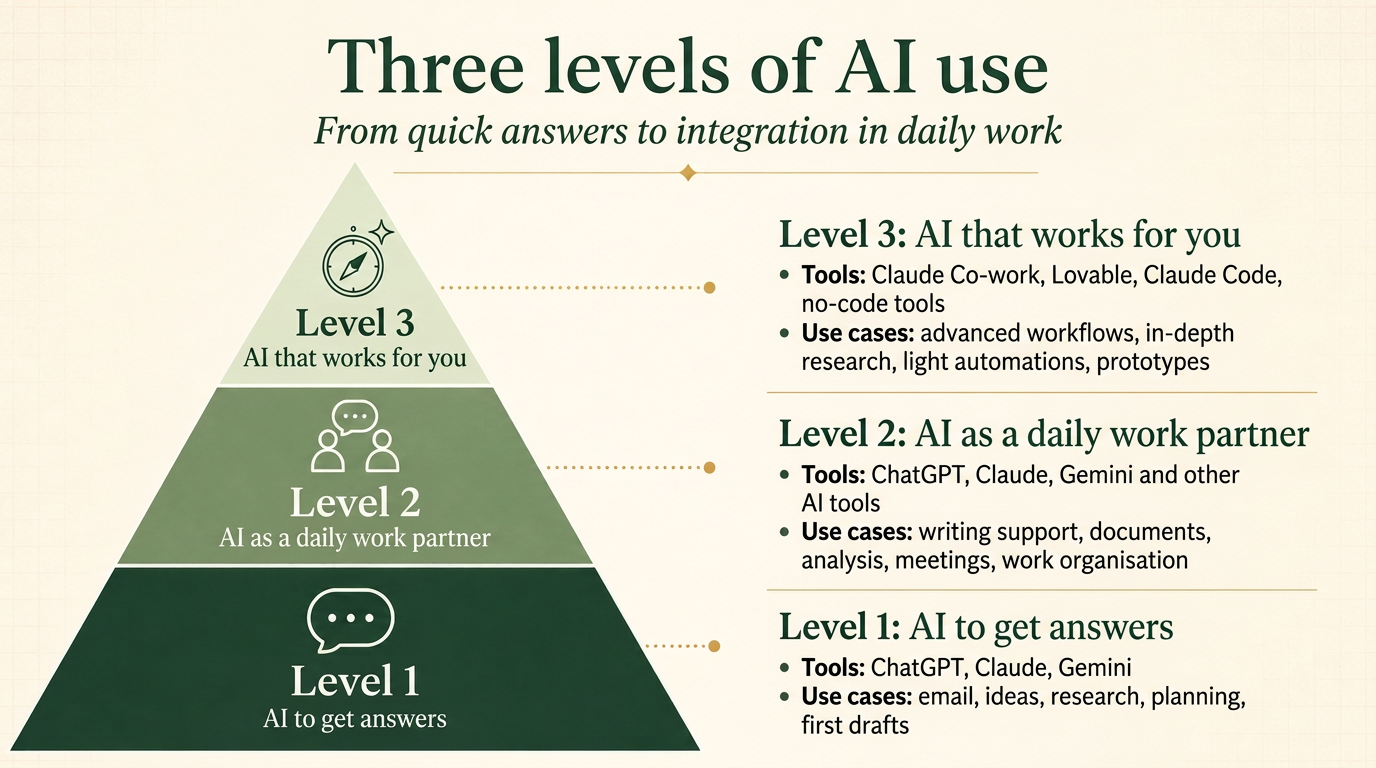
Artificial intelligence is already available: in browsers, in offices, on phones, in the software we use every day. The real obstacle is not access to the tools, but knowing how to integrate them into daily work with method, clarity and responsibility.
Many people and organisations feel that AI is important, but don't yet know how to use it concretely to lighten mental load, better organise tasks and improve real-world workflows.
This programme was created to bridge that gap: not to collect tools, but to build habits, playbooks and assistants that remain useful after the training.
THE KEY POINT
The challenge is not finding AI.
It's using it well, every day.
WORKING TOOLS
During the programme we will use concrete AI tools — ChatGPT, Claude and Microsoft Copilot Business — as practical environments for building prompts, playbooks, assistants and workflows applicable to everyday work.
To structure ideas, summarise documents, prepare communications and turn recurring tasks into reusable procedures.

To work on long documents, in-depth document analysis, structured reasoning, context-rich projects and professional assistants.

To apply AI within the Microsoft 365 tools already used in daily work: email, documents, presentations, meetings, spreadsheets and internal collaboration.
Trademarks and logos belong to their respective owners. The training is independent and does not imply any partnership, certification or endorsement by the vendors mentioned.
The previous AI course organised by Polo Poschiavo drew strong interest among professionals, businesses and organisations in the region. It was a first step towards discovering what artificial intelligence can do and how to start experimenting with it.
In 2026 the programme goes beyond discovering the tools. The goal is to use AI to work better: email, meetings, documents, projects, specialised assistants and improved workflows, always with a practical approach applied to participants' real cases.
From curiosity about AI to everyday use for increased personal and professional productivity.
A programme designed for professionals, SMEs and local organisations that want to use AI to work better, with no technical prerequisites.
DO YOU RECOGNISE YOURSELF IN THESE SITUATIONS?
This training is designed for anyone who deals every day with information, requests, emails, documents, meetings, priorities and operational decisions — and wants to use AI to work with more clarity, method and consistency.
Emails, documents, messages and requests spread across too many channels.
Meetings, urgent matters and shifting priorities make it hard to work with calm and method.
Repetitive tasks that could become clearer playbooks, assistants or workflows.
Businesses that want to improve organisation, communication and internal flows with AI, starting from real cases.
Consultants, craftspeople and freelancers who manage clients, documents, communications and projects.
People who coordinate tasks, deadlines, correspondence, documents and operational support in the office.
Bodies, cooperatives and associations that want to better structure information, processes and communication.
Anyone who deals daily with information overload, meetings, summaries, follow-ups and project coordination.
No technical skills required. Just bring a real case from your own work, and the willingness to improve how you organise information, tasks and decisions.
Practical outcomes, not abstract theory. Every module connects to everyday work.
PROMPTING METHOD (BUILDING EFFECTIVE AI INSTRUCTIONS)
Getting useful answers from AI takes more than writing a question. You need to build the right context: who you are, what you need and how to recognise a good result.
Throughout the programme we will use this framework to create prompts, playbooks and AI assistants applicable to everyday work.
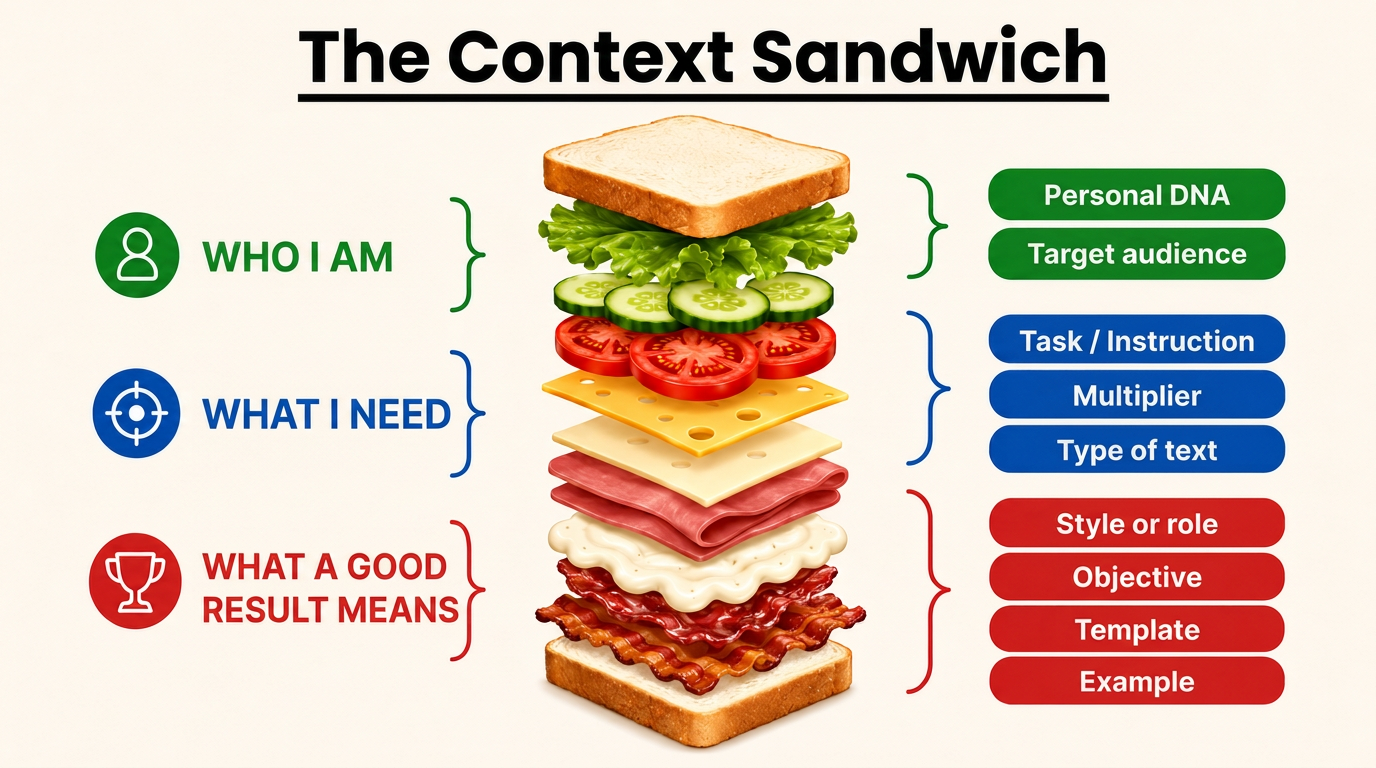
Each outcome results from progressively applying the method to participants' real cases.
A guided programme that starts from real problems and arrives at solutions applicable right after the training.
Start from a concrete challenge faced by the participant or organisation.
Map how the work is done today, step by step.
Identify repetition, bottlenecks and unnecessary load.
Build reusable instructions and prompts for recurring tasks.
Configure AI assistants suited to specific tasks.
Redefine the workflow with AI integrated in a useful way.
Conclude with a tangible result to apply straight away.
Visual path
Real problemCurrent workflowWaste and frictionAI playbookSpecialised assistantsImproved workflowPrototype or blueprint
AI Strategy & Architecture Leader: from strategy to architecture, through to operational deployment.
Yannick Lhérieau is an AI Strategy & Architecture Leader in Switzerland. He lives in Prada and brings to the Polo Poschiavo programme a rare combination of skills: the ability to connect strategic vision, AI systems architecture, everyday productivity and concrete implementation.
His work involves stress-testing and structuring AI strategy at executive level, designing scalable architectures — data, orchestration, LLM (generative AI model) integration — and turning fragmented initiatives into more robust, usable, results-oriented end-to-end systems.
With over 30 years of experience, P&L responsibility of up to USD 120M, leadership across Europe and India, enterprise environments, multi-country operations and the scaling of complex systems, Yannick brings a concrete perspective: not just understanding AI, but embedding it in the way people work, in processes and in real workflows.
Experience and background
For Polo Poschiavo, this means a practical, accessible, execution-oriented programme: starting from participants' everyday problems and turning them into playbooks, AI assistants, improved workflows and, where useful, first digital prototypes.
Enterprise experience, concrete programme: the same strategic and architectural depth applied to everyday work, workflows and real productivity in Valposchiavo.

Yannick Lhérieau
AI Strategy & Architecture Leader
Prada · Switzerland
FROM EVERYDAY WORK TO AI SYSTEM DESIGN
What he brings to the programme
Start from participants' concrete problems: information management, priorities, email, meetings, documents, projects and operational decisions.
Connect AI vision, workflow design, LLM integration and the ability to bring solutions to concrete use.
Not just teaching AI tools, but building reusable playbooks, workflows and assistants, with clear value criteria and human control.
A programme designed for the Valposchiavo context, enriched by experience in enterprise environments, international leadership and the scaling of complex systems.
Eight progressive modules, from real case to applicable outcome.
A progressive evening format, designed to be compatible with everyday work and the local calendar.
The programme will be organised in evening sessions, at a regular and sustainable pace. The goal is to let participants progress step by step, without overloading their professional or personal schedule.
Sessions are planned for Friday evenings, from 18:00 to 20:00, each lasting 2 hours. The final calendar will take into account periods of local sensitivity, in particular the hunting season and school holidays.
To maintain real progress between sessions, a simple, practical homework task linked to each participant's real case will be proposed after every session.
Sessions on Friday evenings, from 18:00 to 20:00, each lasting 2 hours.
Each participant should have a laptop, a stable internet connection and an active account for a general-purpose AI assistant, preferably ChatGPT or Claude. There is no need to subscribe to both services: one is enough. Those using Microsoft 365 or Google Workspace may also work, where available and authorised by their organisation, with the AI already integrated into their professional environment: Microsoft 365 Copilot or Gemini in Google Workspace. For the exercises, it will be useful to have a real work case available, avoiding the use of confidential or unauthorised data.
After each session a practical homework task will be proposed: completing a worksheet, testing a prompt, improving a workflow, preparing materials or applying a step to your real case.
RECOMMENDED AI TOOLS
There's no need to multiply subscriptions. The most useful combination depends on the tools you already use in your work.
A simple rule: one general-purpose assistant for learning, plus the AI in your own work environment for acting.
ChatGPT or Claude
Choose a single general-purpose AI assistant to use during the course for writing, analysing, summarising, translating, organising ideas and experimenting with new ways of working.
There is no need to have both.
Microsoft 365 Copilot
Recommended for those working mainly with Outlook, Word, Excel, PowerPoint, Teams and the other Microsoft 365 tools.
Usable only if available and authorised by your organisation.
Gemini in Google Workspace
Recommended for those working mainly with Gmail, Drive, Docs, Sheets, Slides and Meet.
Usable only if activated on your Google Workspace account.
The recommended combination
A general-purpose AI assistant to learn and experiment. The AI integrated into your own work environment to apply what you've learned to everyday tasks, when available.
Documents, company information, personal data or confidential content must only be used with AI tools when this is permitted by your organisation. With a personal account, use only anonymised examples or non-confidential information.
Progression
Sessionhomework exerciseapplication to the real casefollow-up discussionprogressive improvement
The homework is not theoretical: it links each session to your professional context, so that the programme produces applicable results and not just general knowledge.
By the end of the programme, every participant leaves with tools and a method, not just notions.
A personal system for enhanced productivity
A library of prompts and playbooks
AI assistants configured for real cases
Improved workflows
Practical rules for responsible use
An immediate application plan
Contact Polo Poschiavo for a no-obligation conversation. We'll help you assess whether the programme meets your needs and those of your organisation.
Polo Poschiavo
No online form: contact us directly to discuss the programme and assess together whether it suits your needs.
